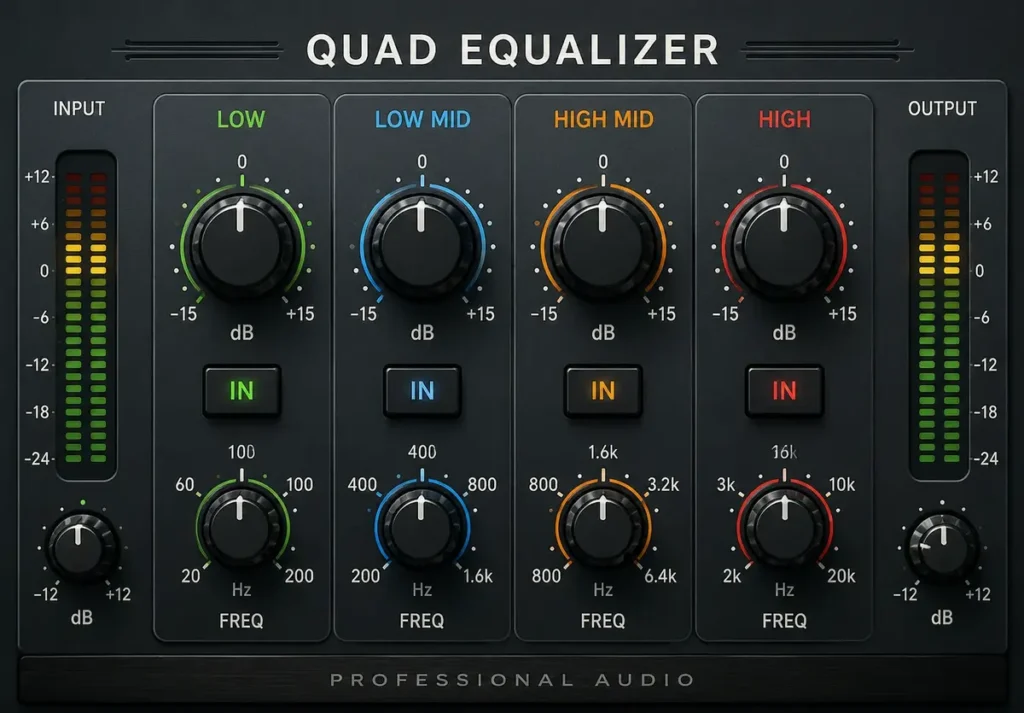
Flat, lifeless sound ruins your listening experience. Cranking the volume only makes muddy bass louder and harsh highs more painful. A quad equalizer solves this by splitting your audio into four adjustable frequency bands. You gain direct control over bass, low-mids, high-mids, and treble to shape every song the way the artist intended.
What Is a Quad Equalizer and How Does It Work?
A quad equalizer is an audio processing tool that divides the sound spectrum into four separate frequency bands. Each band carries its own gain control, letting you boost or cut specific ranges measured in decibels (dB).
When you adjust a band, the unit reshapes the frequency response of your audio signal in real time. Turn up the bass band, and low-end warmth increases immediately. Pull down the treble band, and piercing highs soften without touching the volume knob.
This four-band design sits right between simple two-band tone controls and complex 31-band graphic units. It gives you enough precision to fix real sound problems without overwhelming beginners or casual listeners.
The Four Frequency Bands Explained
Every quad equalizer splits the audible spectrum (20 Hz to 20,000 Hz) into four distinct zones. Understanding each zone helps you make smarter, faster adjustments.
- Bass (20–250 Hz): Controls the deep rumble of kick drums, bass guitars, and sub-bass synthesizers.
- Low-Mid (250–2,000 Hz): Shapes the body and warmth of vocals, pianos, and rhythm guitars.
- High-Mid (2,000–6,000 Hz): Affects vocal clarity, snare drum crack, and overall instrument presence.
- Treble (6,000–20,000 Hz): Adds air, sparkle, and cymbal shimmer to your listening experience.
Each band on a typical unit offers ±12 dB of gain. Small adjustments of 2–3 dB often produce the most natural, pleasing results.
Quad Equalizer vs Graphic Equalizer: Key Differences
A graphic equalizer uses fixed frequency bands — often 10, 15, or 31 sliders — spaced at set intervals across the spectrum. A quad equalizer gives you just four bands, but each band covers a much wider frequency range.
Graphic EQs shine in live sound reinforcement and room correction where you need surgical precision across many narrow bands. The four-band approach works better for quick tonal shaping in cars, home stereos, and portable speaker setups.
Think of it this way: a graphic equalizer is a full mechanic’s toolbox, while a quad equalizer is a well-chosen set of four essential wrenches. Both get the job done, but the simpler option saves time and reduces guesswork.
How to Set Up a Quad Equalizer in Your Car
Car audio systems benefit enormously from a quad equalizer because vehicle interiors create wildly uneven sound reflections. Hard surfaces like glass, plastic dashboards, and metal doors bounce certain frequencies back at your ears, creating harsh peaks and frustrating dead spots.
Start by setting all four bands to flat (0 dB). Play a familiar song with balanced instrumentation — something you have heard hundreds of times on good headphones. Listen carefully for problems like boomy bass, hollow vocals, or sharp cymbals.
Adjust one band at a time. If the bass sounds muddy, cut the bass band by 2–3 dB rather than boosting the treble to compensate. This subtractive approach keeps your audio signal clean and prevents speaker distortion.
Mount the unit within arm’s reach of the driver’s seat so you can make quick adjustments for different music styles, passenger counts, or highway speeds.
Best Quad Equalizer Settings for Different Music Genres
No single setting works for every genre. Your quad equalizer should adapt to the music you play most often throughout the week.
- R&B and hip-hop: enhance treble +1 dB, decrease high-mids −1 dB, maintain low-mids flat, and enhance bass +3 dB.
- Rock and Metal: Cut bass −1 dB, boost low-mids +2 dB, boost high-mids +3 dB, boost treble +2 dB.
- Classical and Jazz: Keep bass flat, boost low-mids +1 dB, keep high-mids flat, boost treble +2 dB.
- Pop and Electronic: Boost bass +2 dB, cut low-mids −1 dB, boost high-mids +2 dB, boost treble +1 dB.
For the majority of listeners and cars, these starting positions are effective. Tweak each band by ear until the music sounds right in your specific space.
Quad Equalizer vs Parametric Equalizer: Which One Fits Your Needs?
A parametric equalizer lets you choose the exact center frequency, bandwidth (Q factor), and gain for each band. A quad equalizer locks the center frequencies in place and only lets you adjust the gain up or down.
Parametric EQs offer unmatched precision for studio mixing, mastering, and live sound engineering. The four-band design trades that surgical flexibility for speed and everyday simplicity.
For most car audio and home listening setups, a quad equalizer delivers all the tonal control you actually need. Reserve parametric units for recording studios and professional sound reinforcement rigs.
Common Quad Equalizer Mistakes That Ruin Your Sound
Many people sabotage their own audio by making a few predictable errors when tuning their system.
Boosting everything at once. Pushing all four bands up +6 dB does not improve sound quality. It simply makes the overall signal louder and pushes your amplifier dangerously close to clipping.
Ignoring the source material. A poorly recorded track will not sound great no matter how you adjust the controls. Start with high-quality audio files (320 kbps MP3 or lossless FLAC) for the best possible results.
Setting and forgetting. Road noise, passenger count, and window position all change how sound behaves inside a car. Revisit your settings when driving conditions shift.
How a Quad Equalizer Improves Car Audio Systems
Factory car speakers often sound thin and tinny because automakers prioritize cost savings over audio quality. Adding a quad equalizer to your head unit lets you compensate for these hardware limitations without replacing every speaker in the vehicle.
A well-tuned four-band setup can make a $200 factory system sound remarkably close to a $600 aftermarket installation. The secret is cutting problem frequencies rather than boosting weak ones.
According to the Audio Engineering Society (aes.org), proper equalization reduces listener fatigue during long drives by smoothing out harsh frequency peaks that strain the human ear over extended periods.
Quad Equalizer Settings for Home Stereo and Studio Use
Home listening rooms present different acoustic challenges than car interiors. Room dimensions, furniture placement, and speaker position all color the sound before it ever reaches your ears.
Place your speakers at ear level and form an equilateral triangle with your primary listening position. The remaining tonal problems that room treatment is unable to resolve should then be addressed with your equalizer.
If your room has lots of hard surfaces like tile floors and bare walls, cut the high-mid band by 1–2 dB to reduce harsh reflections. If your speakers sit in corners, cut the bass band to tame the low-end buildup caused by boundary reinforcement.
Top Quad Equalizer Brands Worth Your Money
Several manufacturers produce reliable four-band equalizer units for different budgets and listening environments.
- Pioneer: Known for clean signal paths and intuitive controls in car audio head units with built-in 4-band tuning functions.
- Alpine: Offers precise frequency control with time correction features in their premium receiver lineup.
- Kenwood: Delivers warm, musical EQ curves that flatter most music genres right out of the box.
- Clarion: Budget-friendly units that still provide smooth, noise-free gain adjustments across all four bands.
The Acoustical Society of America (acousticalsociety.org) publishes peer-reviewed research on how different equalization curves affect perceived sound quality across various listening environments.
How to Read a Quad Equalizer Frequency Chart
A frequency chart displays the four bands of your equalizer as overlapping bell curves on a two-dimensional graph. The horizontal axis shows frequency in Hertz (Hz), and the vertical axis shows gain in decibels (dB).
When you boost a band, its bell curve rises above the 0 dB centerline. When you cut a band, the curve dips below. The width of each bell curve shows how many neighboring frequencies the adjustment affects.
Reading this chart helps you visualize what your ears already hear. If two bands overlap heavily in the low-mid region, boosting both will create a much larger change than you might expect from the numbers alone.
Advanced Tuning Tips for Audiophiles
Once you master the basics, these techniques will squeeze even better performance from your four-band setup.
Use reference tracks. Pick three songs you know intimately from listening on high-quality headphones. Match your car or room sound to those reference recordings by adjusting one band at a time.
Apply the subtractive method. Instead of boosting frequencies you want more of, cut the frequencies you want less of. This preserves amplifier headroom and keeps your system running cool and clean.
Test at multiple volumes. Human hearing changes with loudness due to the Fletcher-Munson effect. A setting that sounds perfect at moderate volume may need a slight bass boost when you turn the music down for late-night listening.
The National Institute of Standards and Technology (nist.gov) publishes reference data on human auditory perception that explains why our ears respond differently to various frequencies at changing volume levels.
Quad Equalizer Frequency Band Breakdown
| Band | Frequency Range | Controls | Typical Adjustment | Best For |
| Bass | 20–250 Hz | Kick drums, bass guitar, sub-bass | ±3 to ±6 dB | Hip-hop, EDM, action movies |
| Low-Mid | 250–2,000 Hz | Vocals, piano, rhythm guitar | ±2 to ±4 dB | Rock, pop, podcasts |
| High-Mid | 2,000–6,000 Hz | Vocal clarity, snare, presence | ±1 to ±3 dB | Acoustic, jazz, audiobooks |
| Treble | 6,000–20,000 Hz | Cymbals, air, sparkle, detail | ±1 to ±3 dB | Classical, ambient, vocals |
Take Control of Your Sound Today
Your speakers already produce better sound than you currently hear. A quad equalizer unlocks that hidden quality by putting four precise frequency controls directly at your fingertips. Start with the flat preset, play your favorite song, and adjust one band at a time. You will hear a real, noticeable difference within minutes.
Open your car’s audio settings or grab your home stereo remote right now. Spend five minutes tuning your system using the genre presets above. Share your favorite settings in the comments and help fellow listeners discover the sound they have been missing.